

Services / Automate2Generate

CRM and Lead Automation for Small Businesses

Give every inquiry a clear next step. Connect your forms, follow-up, and pipeline so your team can keep the conversation moving.

Toms River, NJ · Serving New Jersey, nationwide & globally

Built around your business

Clear message. Thoughtful design. Connected details.

A new inquiry is only the beginning of a sales journey. Someone needs to review it, decide the next action, contact the prospect, and keep the record current.

Our approach to crm + lead automation

CRM and lead automation organize inquiries, assign follow-up, and move opportunities through a defined sales process. They are for businesses that lose track of calls, forms, appointments, or estimates across disconnected tools. Automate2Generate builds practical pipelines and workflows that support timely communication while keeping people responsible for the customer relationship.

A new inquiry is only the beginning of a sales journey. Someone needs to review it, decide the next action, contact the prospect, and keep the record current. When that work lives in separate inboxes, notebooks, text threads, and calendars, it becomes difficult to know which opportunities are active and which have stalled.

We map the process before configuring software. The aim is a workable system your team can understand: a clear record, a useful pipeline, defined responsibilities, sensible messages, and an obvious way to take over. Automation should remove avoidable administration without sending customers into conversations that nobody owns.

What’s included in your project?

  • Inventory of lead sources, existing systems, administrative access, and handoff gaps.
  • A documented pipeline with meaningful stages and ownership rules.
  • Agreed form-to-CRM field mapping and supported integrations.
  • Approved acknowledgments, reminders, follow-up messages, and stop conditions.
  • Human escalation, failed-connection handling, and workflow pause procedures.
  • Testing of priority journeys, duplicate handling, and customer responses.
  • Team handoff and a defined maintenance or optimization scope.

Design in practice

See what a clearer experience looks like.

Explore our portfolio for website design and implementation examples.

Explore our work ↗
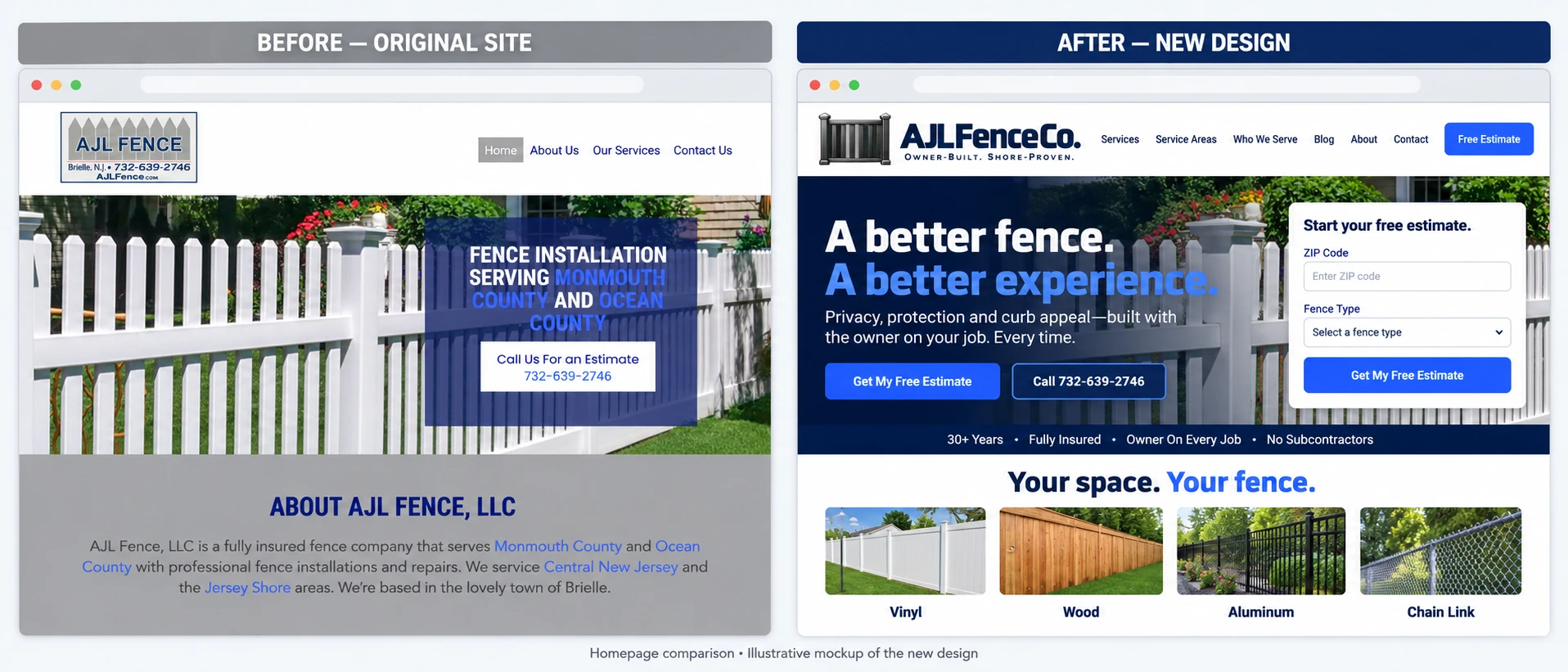
AJL Fence original homepage alongside an illustrative redesign with clearer services and an estimate form
AJL Fence: original site and illustrative redesign.

The details that matter

A closer look at your project.

What should a CRM pipeline actually represent?

A pipeline should describe real business stages, not decorative columns.

Explore this topic: What should a CRM pipeline actually represent?

A pipeline should describe real business stages, not decorative columns. A contractor might distinguish a new inquiry, a qualified opportunity, a scheduled site visit, an estimate delivered, and a decision pending. A consultation business may need different stages. We define what each stage means, who updates it, and which actions belong there before building automations around it.

Useful records include only the information your team needs to do the work. That can include the requested service, town, lead source, owner, last contact, next action, and relevant notes. Required fields should support a decision, not create busywork. Duplicate records, inconsistent labels, and unclear permissions can make an expensive CRM feel less reliable than the spreadsheet it replaced.

How do automated lead responses and missed-call messages work?

An initial response can acknowledge an inquiry, confirm that it reached the business, and explain the next step.

Explore this topic: How do automated lead responses and missed-call messages work?

An initial response can acknowledge an inquiry, confirm that it reached the business, and explain the next step. It should identify the business and avoid implying that a human has reviewed details when that has not happened. If your workflow includes missed-call text-back, we establish the trigger, permitted message content, contact preferences, and the conditions that stop further messages.

A good sequence has an exit as well as a start. Follow-up should stop or change when the person replies, books, declines, becomes a customer, or asks not to be contacted. Multiple entry points should not create duplicate sequences. Message timing, opt-out handling, consent records, and platform requirements are reviewed for the chosen channels rather than treated as universal software defaults.

Can forms, calendars, and existing tools work together?

Often they can, but integration feasibility needs to be checked.

Explore this topic: Can forms, calendars, and existing tools work together?

Often they can, but integration feasibility needs to be checked. We inventory the current website, forms, email, phone system, scheduling, CRM, and any other sources of leads. Then we identify supported connections, administrative access, field mapping, and the system that should be authoritative for each record. A native integration may be enough; a more complex process may require additional work.

The important question is what happens when a connection fails. Does the inquiry remain visible? Is someone notified? Can it be retried safely without creating a second customer record? We review the failure path along with the successful one. A workflow that looks impressive in a diagram is not finished until it handles incomplete data and routine exceptions sensibly.

Which follow-up tasks are good candidates for automation?

Repeatable tasks with clear rules are a good starting point.

Explore this topic: Which follow-up tasks are good candidates for automation?

Repeatable tasks with clear rules are a good starting point. Examples include acknowledging a submitted form, assigning an owner, creating a callback task, sending an agreed appointment reminder, or notifying the team that an estimate needs attention. The best first workflow is usually one with a specific trigger, a predictable action, and an outcome the team can verify.

Judgment-heavy conversations deserve a person. Scope changes, sensitive complaints, unusual requests, negotiation, and complex service advice should have an escalation route. We avoid turning every task into an automated message. A useful workflow may simply place the right information in front of the right team member at the right stage, with enough context to act.

How do we test the system before using it with real leads?

Testing covers the agreed entry points and stage changes.

Explore this topic: How do we test the system before using it with real leads?

Testing covers the agreed entry points and stage changes. We submit test forms, check field mapping, trigger assignment rules, review message wording, and verify calendar behavior where included. We also test replies, booking changes, duplicate entries, opt-outs, and conditions that should stop a sequence. The checks follow the actual business journey rather than a software demonstration.

The handoff needs usable documentation. Your team should know how to find a new inquiry, update its stage, pause a workflow, correct a record, and identify a failed connection. Access should match staff responsibilities. We scope training and maintenance explicitly so a live automation does not become an unattended system that nobody knows how to adjust.

How do you know whether lead automation is helping?

Measurement should connect workflow activity to the sales process.

Explore this topic: How do you know whether lead automation is helping?

Measurement should connect workflow activity to the sales process. Useful questions include whether accepted inquiries received an owner, whether callbacks were completed, whether prospects booked, and whether estimates progressed. A delivered message is an activity signal, not proof of a qualified opportunity or sale. We define the available reporting before promising a dashboard.

This service fits businesses with a repeatable process and someone responsible for using the CRM. It is less suitable when the business has no defined offer, cannot respond to customers, or expects software to make every sales decision. Pricing depends on the number of workflows, channels, integrations, records, and support requirements. Platform subscriptions and usage charges are identified separately.

Where can you review our work?

Detailed case studies coming soon.

Explore this topic: Where can you review our work?

Detailed case studies coming soon. You can explore the Automate2Generate portfolio for published examples of our work. We distinguish completed work from measured results and publish client-specific outcomes only when the evidence is available and approved.

How does our process work?

  1. Map the existing lead journey

    We review how inquiries arrive, who handles them, where records live, and where follow-up stalls. The output is a clear process map and a focused first implementation scope.

  2. Define records and rules

    We establish pipeline stages, fields, owners, triggers, messages, timing, and stop conditions. Channel permissions and supported integrations are checked before configuration.

  3. Build and test the workflows

    We configure agreed connections and automations, then test normal journeys and routine exceptions. Your team reviews the messages and confirms that the record contains the context needed to act.

  4. Train and refine

    We explain how to manage records, pause sequences, and resolve common problems. Ongoing changes are guided by workflow reliability and sales-process evidence rather than message volume alone.

The Automate2Generate difference

Why does editorial-grade writing make this work better?

Automated writing should still sound like the business. We use clear messages that explain why the person is receiving them and what should happen next. We remove artificial urgency, vague promises, and wording that pretends a staff member has personally reviewed a request. Editorial attention matters because a technically correct workflow can still damage trust when its messages are confusing, repetitive, or badly timed.

Explore our SEO copywriting and content strategy for research, message development, and writing that gives the technical work something useful to support.

Which approach fits your business?

Compare scope, tools, and responsibilities
Planning comparison: actual scope depends on your business and chosen tools.
ConsiderationDo it yourselfTemplate / single toolAutomate2Generate
Content qualityYour team writes and revises the messages.Prebuilt sequences need business-specific review.Messages are edited around the actual service, tone, timing, and next step.
Pipeline designYou define the stages and ownership.A standard pipeline provides a starting point.Stages reflect the real sales journey and the team actions required.
Integration testingYou check mappings and connection failures.Compatibility depends on the selected tools.Agreed entry points, duplicate risks, failures, and stop conditions are reviewed.
Human handoffYour team develops its own procedures.Default alerts may need adjustment.Owners, escalation rules, and maintenance responsibilities are documented.

What work can you see before deciding?

Explore our website portfolio to see published design and implementation examples. Detailed service-specific case studies are coming soon. Portfolio examples show the work; they are not a claim of measured traffic, rankings, or revenue gains.

How is pricing determined?

We scope the project around the pages, content, integrations, account access, and ongoing support you actually need. You receive a written proposal describing deliverables, exclusions, responsibilities, and any third-party costs before work begins. Ask us to separate one-time implementation from recurring support so you can compare the full commitment.

A few useful answers

Common questions.

Can you work with the CRM I already use?

We assess the current system and its supported integrations before recommending changes. Keeping useful tools can be more practical than moving everything to a new platform.

Can a missed call trigger a text?

That is possible with suitable phone and messaging tools. We review the trigger, message, contact permissions, opt-out behavior, and handoff before enabling the workflow.

Will every lead receive the same sequence?

Not necessarily. The service requested, lead source, status, and customer response can determine the next action. We keep the rules understandable and avoid overlapping sequences.

Can appointment reminders be automated?

Yes, where the scheduling system supports the needed connection. The workflow should handle booking changes, cancellations, time zones, and the conditions that stop reminders.

Can automation replace my sales team?

It can support repeatable administration and communication, but people remain responsible for judgment and the customer relationship. We define clear points where a staff member takes over.

How long does setup take?

Timing depends on access, integrations, data cleanup, workflow complexity, and message approval. We agree on milestones once those dependencies are understood.

What happens if an integration fails?

The implementation plan should define where the inquiry remains visible and who is notified. We test relevant failure paths and document how to pause or repair the workflow.

What does CRM automation cost?

Pricing depends on the workflows, channels, integrations, migration, and ongoing support. Software subscriptions, messaging usage, and other third-party costs are separate items in the proposal.

How does this connect to your wider growth system?

Your next move

Let’s work on the right opportunity.

Tell us about your business and the result you want to improve. For an immediate conversation, call 732-569-1793. Project timing and response expectations are agreed during scoping.

We use these details to respond to your inquiry. This does not subscribe you to marketing texts or emails. Privacy policy.